
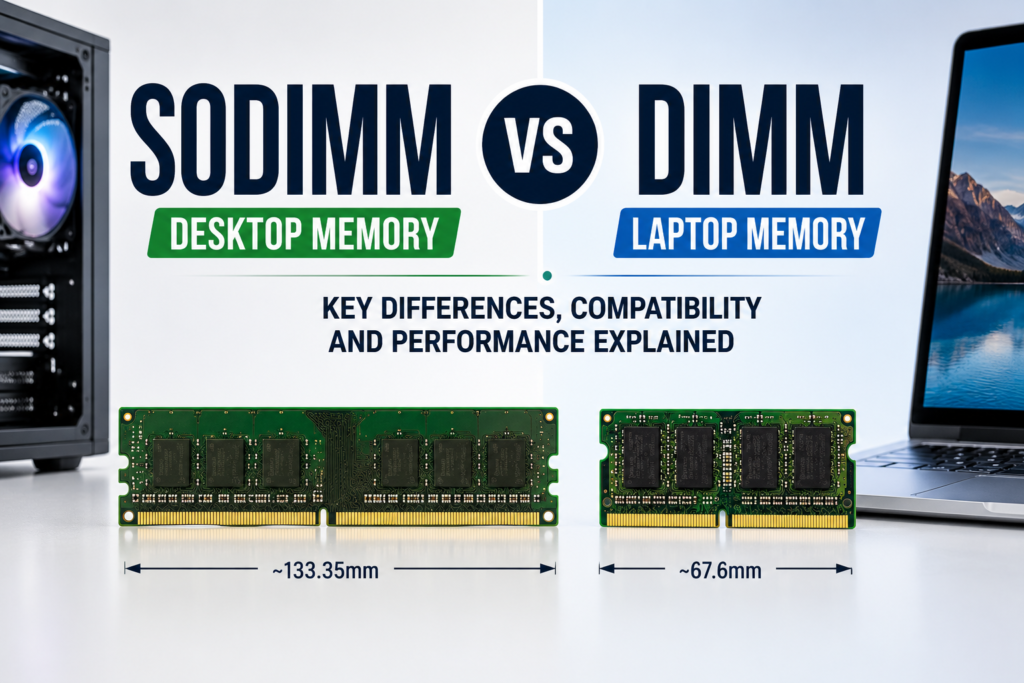
If you’ve ever popped open a laptop and a desktop side by side, you’ve probably noticed the memory sticks don’t look anything alike. That’s not a manufacturing quirk — it’s the difference between SODIMM vs DIMM, two RAM form factors built for completely different machines.
A lot of buyers assume RAM is RAM, order the wrong stick, and end up with a module that simply won’t sit in the slot. Picking the correct one matters just as much as picking the right speed or capacity, because the wrong form factor isn’t a performance problem — it’s a compatibility dead end.
Key Takeaways
- DIMM is the full-size memory module used in desktops, workstations, and servers.
- SODIMM is the compact version built for laptops, mini PCs, and small form factor devices.
- The two are physically incompatible — a SODIMM will not fit a standard DIMM slot, and vice versa.
- Performance differences come down to DDR generation and speed, not the form factor itself.
- DDR4 RAM and DDR5 RAM both come in SODIMM and DIMM versions.
- Servers typically rely on RDIMM or ECC memory, while consumer PCs use standard UDIMM.
What Is DIMM RAM?
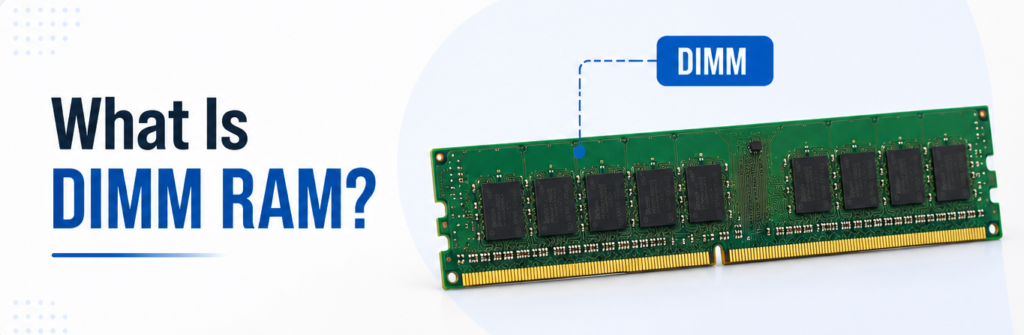
DIMM is a packaging format for DRAM chips and the common memory module used in most desktop towers, workstations, and server racks. The term “dual in-line” derives from the fact that each side of the module has its own set of pins which are independent from one another, thus conferring increased bandwidth over older designs that used a single in-line module.
In terms of dimensions, a DIMM stick is approximately 133.35mm in length and fits into a full-length DIMM slot with side clips. Typically, the motherboard has 2 to 4 slots to accommodate DIMM memory, contributing to its continued popularity as a dual-channel memory configuration and as a means to provide extra memory space in the future.
You’ll see DIMM in three main environments:
- Desktop PCs built for everyday use or content creation
- Gaming Systems where headroom for higher capacity matters
- High-performance builds, including workstations running memory-heavy software
The larger size isn’t just for looks — it leaves room for more memory chips per module, which is why DIMM sticks routinely hit higher capacities than laptop RAM, and why it remains the default for desktop memory modules.
What Is SODIMM RAM?
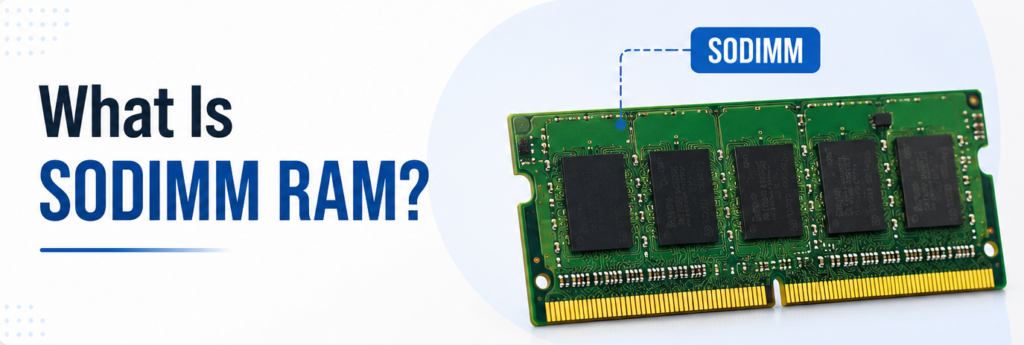
SODIMM (Small Outline Dual In-Line Memory Module) is the smaller sibling of DIMM, designed for applications where space is at a premium. It’s some 67.6mm long, which is about half of the standard stick’s length, allowing it to fit into a slim laptop enclosure.
You’ll find SODIMM memory modules in:
- Laptop RAM slots, such as gaming and business laptop slots.
- Mini PCs, such as NUC-style mini PCs, are also a great option to consider.
- Small Form Factor Devices are compact workstations as well as some of the all-in-one desktops.
Although the SODIMM is smaller, it is not a low-power version of the DIMM. The modern SODIMM sticks can support the same range of DDR4 RAM and DDR5 RAM as their counterparts in the full-sized format, and the high-end laptop variants can be as fast as desktop memory. The true competition is in terms of capacity per stick and number of slots. Most laptop boards have just 1 or 2 slots, while desktop boards typically offer 2 to 4.
SODIMM vs DIMM: The Key Differences at a Glance
Before going deeper, here’s a side-by-side snapshot of how DIMM vs SODIMM compares across the factors that actually affect a buying decision.
| Feature | DIMM | SODIMM |
|---|---|---|
| Physical Size | ~133.35 mm long | ~67.6 mm long |
| Pin Count | 288-pin (DDR4/DDR5) | 260-pin (DDR4), 262-pin (DDR5) |
| Device Type | Desktops, workstations, servers | Laptops, mini PCs, compact systems |
| Capacity | Higher per-module capacity | Lower per-module capacity |
| Speed | Comparable at the same DDR generation | Comparable at the same DDR generation |
| Upgradeability | More slots, easier expansion | Fewer slots, limited expansion |
| Typical Use | Gaming rigs, workstations, servers | Laptops, ultrabooks, small builds |
| Price | Generally lower per GB | Often higher per GB |
SODIMM vs DIMM Size Difference
There is only one reason these two are not interchangeable, and that is their size. The extra length of the DIMM allows engineers to place additional memory chips and a larger pin interface on desktop boards, hence the higher memory capacity. To fit the tiny laptop and mini-PC enclosures that don’t have much space.
This is not only a visual variation, but also a factor that influences the installation. A SODIMM memory stick snaps into place with a 30-degree angle in the slot and then flattens against it, whereas a DIMM memory stick is pressed straight into the slot with side clips snapping into place. If you attempt to push it into the wrong slot, you could break the pins or even the motherboard.
| Dimension | DIMM | SODIMM |
|---|---|---|
| Length | ~133.35 mm | ~67.6 mm |
| Height | ~30 mm | ~30 mm |
| Pin Count (DDR4) | 288-pin | 260-pin |
| Pin Count (DDR5) | 288-pin | 262-pin |
| Notch Position | Fixed per DDR generation | Fixed per DDR generation, different from DIMM |
Within a DDR family, it is the notch location that distinguishes SODIMM from DIMM, and is one of the built-in protections that will stop the wrong part from fitting in the wrong slot.
Learn the differences between SAS vs SATA before choosing a storage drive.
SODIMM vs DIMM Performance and Gaming
It’s a different story; that’s where many customers get confused – form factor, performance. If both are running at similar latency, then they will be at the same speed: DDR5-6000 SODIMM and DDR5-6000 DIMM. It’s not the form factor that affects frame rates, load times, or bandwidth; only DDR gen, clock speed, and timings are printed on the spec sheet.
But in the real game, the desktop version seems to have the edge: DIMM slots are more likely to be dual-channel, larger memory capacities are more readily available, and XMP profiles are more broadly supported in the desktop BIOS menus than in the laptop BIOS. On a laptop, SODIMM modules perform well with DDR5 and are generally more “locked down” from the manufacturer’s BIOS.
A few practical points worth knowing:
- Latency (CL rating) affects responsiveness more than form factor does.
- Dual-channel configuration — running two matched sticks instead of one — typically improves gaming FPS more than switching DIMM sizes ever would.
- DDR5 RAM, in either form factor, brings meaningful bandwidth gains over DDR4 for memory-hungry games and creative workloads.
- Soldered laptop memory (increasingly common in ultrabooks) isn’t SODIMM at all — it’s non-upgradeable by design, which is a separate issue from form factor performance.
If you’re looking for FPS, start by ordering by DDR generation, speed, and CAS latency first. SODIMM vs DIMM is not a measurement of game performance and only lets you know what fits into your system, not how fast the games will run.
Compatibility — Can You Mix SODIMM and DIMM?
No, SODIMM and DIMM are physically incompatible, period. They have varying lengths, numbers of pins, notch positions, and insertion angles. You can’t insert a SODIMM stick into a DIMM slot, nor can you insert a DIMM stick into a laptop’s SODIMM slot.
The DIMM’s have the pin layout on Desktop boards, while the SODIMM’s have the pin layout for Laptop and mini-PC boards. If you somehow could make the connection, the electrical signaling would not match up.
This is illustrated by a few real-life examples:
- If a user wants to upgrade his/her gaming laptop from 16 to 32 GB memory, he/she requires two SODIMM sticks; otherwise, a month of returns will be wasted if he/she orders desktop DIMM RAM by mistake.
- While it is still technically a desktop, someone building a compact desktop would require SODIMM RAM, due to the saving of space with a mini PC-style board (some small form factor systems actually use SODIMM slots).
The best advice before purchase: don’t guess whether the device is a “laptop” or “desktop“; read the spec sheet for your specific model!
Can SODIMM Be Used in a Desktop Motherboard?
Generally, no — standard desktop motherboards are built exclusively for DIMM slots, and a SODIMM stick simply won’t physically fit. The pin count, notch position, and slot length are all different, so there’s no way to seat it correctly.
There is a narrow exception: SODIMM-to-DIMM adapter boards exist, and a small number of compact or SFF-focused desktop boards are designed around SODIMM slots from the factory to save internal space. But adapters carry real downsides — they can introduce signal instability, they’re not universally supported by every board’s memory controller, and they often void warranties.
For the vast majority of desktop builders, the practical advice is simple: buy DIMM RAM for a DIMM board, and skip the adapter route unless you’re working with a purpose-built SFF system that explicitly calls for SODIMM.
Can DIMM RAM Fit in a Laptop?
No, a standard DIMM stick is about twice the length of the laptop’s SODIMM slot, and hence cannot be physically inserted. Laptop chassis are designed around the small 67.6mm footprint of SODIMMs, even if it somehow did.
In addition to size, laptop motherboards are wired to deliver voltages and the pin-out for SODIMMs, not DIMMs, making them not interchangeable in terms of electricity as well.
So, the only way to upgrade a laptop’s memory is:
- Check if your exact laptop model has user-upgradeable RAM (most of the newer ultrabooks are soldered and cannot be upgraded at all).
- Use the manufacturer’s recommended generation, speed, and voltage for the DDR.
- Purchase SODIMM sticks, not DIMMs, for replacement/upgrade.
DDR4 vs DDR5: SODIMM and DIMM Generations
Both SODIMM and DIMM are available in DDR4 and DDR5 variants, and the generation of DDR is far more important than the form of the DIMM/SODIMM. For years now, DDR4 RAM has been the norm, providing reasonable speeds (2133MT/s to 3200MT/s stock) at an affordable price per GB. The newer DDR5 RAM standard began at 4800MT/s, and now reaches 8000MT/s and beyond on enthusiast-grade kits.
| Factor | DDR4 | DDR5 |
|---|---|---|
| Typical Speed | 2133–3200 MT/s | 4800–8000+ MT/s |
| Power Efficiency | Standard | Improved (on-die voltage regulation) |
| Pin Count (DIMM) | 288-pin | 288-pin (different key notch) |
| Pin Count (SODIMM) | 260-pin | 262-pin |
| Cost | Lower per GB | Higher per GB (dropping over time) |
| Motherboard Compatibility | DDR4-only boards | DDR5-only boards |
One of the key points that customers sometimes overlook: DDR4 and DDR5 are not interchangeable with each other, even in the same form factor. A DDR5 SODIMM won’t fit into a DDR4 SODIMM slot and vice versa. Unlike the SODIMM vs DIMM situation, it’s important to double-check the generation of your motherboard before upgrading; this is a more common issue for upgraders.
SODIMM vs UDIMM vs RDIMM: Clearing Up the Confusion
When comparing SODIMM vs DIMM vs UDIMM, it helps to separate two different classifications — form factor (SODIMM vs DIMM) and memory type (UDIMM vs RDIMM) — since buyers often confuse the two when purchasing workstation or server memory.
- UDIMM (Unbuffered DIMM): the signal is passed directly from the DIMM to the memory controller without the buffer. This is the default option for desktop computers, gaming computers, and most consumer computers.
- RDIMM (Registered DIMM) introduces a register between the memory controller and chips to enhance stability at high capacities, and it’s the default for most servers with multiple high-density modules.
- ECC Memory (Error-Correcting Code) – In a server or mission-critical workstation, a silent memory error could cause data to be corrupted, and ECC Memory can detect and correct a single-bit memory error without interrupting data operations.
- Non-ECC Memory are those that don’t correct errors and is the one used in almost all consumer desktops and laptops.
| Type | Buffering | Error Correction | Common Use |
|---|---|---|---|
| UDIMM | None | Usually Non-ECC | Consumer PCs, gaming |
| RDIMM | Registered | Usually ECC | Servers, dense workstations |
| SODIMM | None (typically UDIMM-style) | Usually Non-ECC | Laptops, mini PCs |
Which Is Better: SODIMM or DIMM?
There’s no universal winner here — the right answer depends entirely on the device you’re upgrading, so the honest advice is to match the module to the machine rather than chase a “better” spec:
- If you own a desktop → choose DIMM. It’s the only form factor your board physically accepts, and it gives you more slots for future capacity upgrades.
- If you own a laptop → choose SODIMM. It’s the only option that fits, and modern SODIMM kits deliver excellent DDR5 speeds for gaming and productivity laptops alike.
- If you need workstation memory → choose according to motherboard specifications. Some SFF workstations use SODIMM slots to save space, while tower workstations almost always use full-size DIMM, so check the board’s manual rather than assuming based on the device category.
If your goal is raw capacity and easy future expansion, DIMM has the edge simply because desktop boards offer more slots. If your priority is portability, SODIMM is the only realistic choice — there’s no meaningful downside once you’ve matched the DDR generation and speed correctly.
Common RAM Buying Mistakes
Here are some common pitfalls when purchasing RAM.
- Purchasing the incorrect form factor: such as getting the wrong DIMM for a laptop or SODIMM for a desktop tower.
- Mismatching DDR generation – a DDR5 board will not take DDR4 sticks of any form factor.
- Skipping the rated speed: Installing RAM rated faster than your motherboard supports doesn’t help — it will simply run at the board’s maximum speed, wasting money on performance you’ll never use.
- Randomly installing combinations of sticks, such as an 8GB and 16GB stick, will work, but will not maximize dual-channel matching on the combination and can cause that combination to become a performance bottleneck.
- Avoid computer manufacturers’ list of motherboards—Many manufacturers provide a Qualified Vendor List (QVL); if you don’t follow it, you could experience stability problems on high-speed motherboards.
- The lowest-cost kit that works at any given speed is sometimes rated lower than your system’s support speed, and you’ll never know the difference.
How to Choose the Right RAM for Your System?
When thinking about adding anything to your cart, check these points in order:
- Device Type – check for SODIMM or DIMM; refer to the manual or open the case.
- Motherboard compatibility — make sure it supports the correct DDR version, max speed, and max capacity per slot.
- Capacity – 16GB is a good minimum for gaming and general use; 32GB+ is recommended for content creation, multitasking, and/or workstation use.
- Speed: don’t exceed the speed of your motherboard or maintain the same speed; otherwise you will be paying for speed you are not using.
- Future upgrades — leave at least one open slot if possible, or buy your full target capacity now if your board only has two slots.
- Budget — determine if DDR4 (more affordable, still functional) or DDR5 (faster but more expensive) is appropriate for your application and timeframe.
Follow the steps below in this order, and not first price, and you won’t get stuck in the return-and-reorder cycle that many people new to upgrading experience.
Common Questions
Is SODIMM RAM Only for Laptops?
No. SODIMM is a very popular type for laptop computers, but it is also used in small form factor PCs, mini-PCs, some all-in-one computers, and small workstations where space is a premium.
How Do I Know If My RAM Is DIMM or SODIMM?
First, verify the type of device you are looking for: LAPTOPS & Mini PCs = SODIMM, DESKTOP & TOWER = DIMM. Another way to measure the stick is to measure the difference between SODIMM and DIMM (SODIMM is roughly half the length of the DIMM) or to consult your system’s specification sheet.
Can I Use SODIMM Instead of DIMM?
No, not directly. They’re physically and electrically incompatible. There are no alternatives except a SODIMM-to-DIMM adaptor, which isn’t a recommended solution for the majority of users because of stability issues.
Is SODIMM Good for Gaming?
Yes, especially with DDR5 kits in modern gaming laptops. Performance depends on speed and latency, not form factor, so a well-specced SODIMM kit performs comparably to a similarly rated DIMM kit.
Why Is SODIMM RAM So Expensive Now?
Production of SODIMMs is smaller than DIMMs, and demand from laptop computers, mini PCs, and mini workstations has increased. The newer DDR5 SODIMM standard is gaining traction and fetching a higher price.
Is SODIMM RAM Replaceable?
Yes, in most conventional laptops, the SODIMM slots are easily accessible. Many modern ultrabooks, however, have memory soldered directly to the board, so it is not possible to upgrade the memory in them regardless of form factor.
Does SODIMM Perform Slower Than DIMM?
Not inherently. When run at the same DDR generation, speed, and timings, the performance of the two memory types is practically equal. Laptop BIOS restrictions are typically to blame for any real-world problem rather than the module.
Which RAM Type Lasts Longer?
They will both have the same service life if they are run within the rated specifications. Build quality, heat management, and voltage stability are more important factors that determine the longevity of a SODIMM than a DIMM.
Conclusion
The decision between SODIMM vs DIMM is simply this: What device are you upgrading? SODIMM is designed for use in laptops and small systems, and DIMM is designed for desktops and workstations; neither can be used in place of the other. After determining the appropriate form factor, it’s time to focus on the decisions that impact performance: DDR generation, speed, capacity, and motherboard compatibility. If you get those right, then any module you select will work for your system.