
Picking a power supply by wattage alone is one of the most common mistakes first-time builders make. You can buy a unit with more than enough power for your rig and still end up with a PSU that won’t physically fit inside your case. That’s where the ATX vs SFX vs SFX-L question comes in — three form factors that do the same job but were built for completely different kinds of PCs.
A lot of builders get these three mixed up because, on paper, they all convert wall power into clean, usable DC power for your components. What separates them is size, mounting compatibility, cooling capacity, and the type of build they were designed to support. Get the form factor wrong, and you’ll be stuck returning a PSU that simply won’t bolt into your case.
PSU Sizes Explained: ATX, SFX, and SFX-L
Not every PC is built the same way, so power supplies don’t come in one universal size either.
The three primary PSU form factors — ATX, SFX, and SFX-L — exist because desktop towers, gaming PCs, and Mini-ITX builds all have very different amounts of room to work with, and pc power supply sizes have to match that space
There’s sufficient space in a full-size tower to accommodate a larger PSU, with larger fans and more cabling. For a compact PC build, there is a need to find a smaller component that can still provide enough wattage to a modern GPU and CPU without causing overheating.
ATX – The Industry Standard
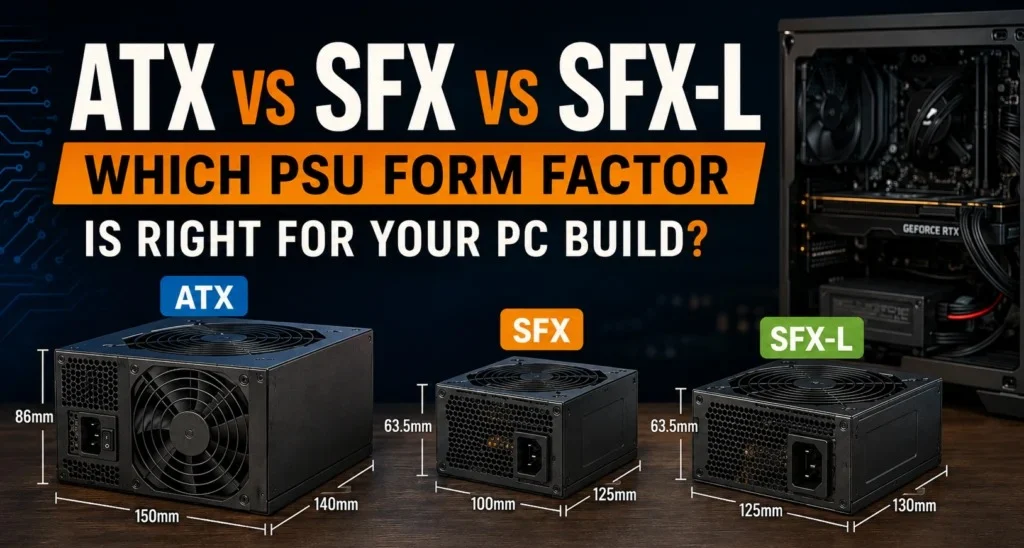
The standard ATX PSU format is used by most desktop pc towers, ranging from cheap office pc’s to high-end gaming computers. Its dimensions are approximately 150mm x 86mm x 140mm, but can be different between different brands and wattage ranges — one of the most popular new builder ATX PSU dimension questions.
Space is the best feature of ATX. Because the unit itself is larger, manufacturers can fit a bigger cooling fan (typically 120mm or 135mm), resulting in quieter operation under load and superior heat dissipation over the PSU’s lifespan. Higher wattage will also be much easier to find in ATX, ranging from 450W up to and beyond 1600W in multi-GPU workstations.
Also, ATX PSUs are the most convenient to upgrade later. It is typical to be able to simply replace the ATX if it is too small or too large, as all of the cases have a standardized mounting pattern for the ATX, which is almost always a drop-in replacement.
| Pros of ATX | Cons of ATX |
|---|---|
| Widest wattage range on the market | Too large for SFF and Mini-ITX cases |
| Quieter cooling thanks to larger fans | Takes up more internal case volume |
| Easiest to source and replace | Not ideal for compact, portable builds |
| Best cable selection and length |
SFX – The Compact Challenger
SFX stands for Small Form Factor, and it was created specifically for people building in tight enclosures where a standard ATX unit simply won’t fit. An sff power supply, such as SFX, will save quite a bit of space in Mini-ITX and other small chassis at about 125mm x 63.5mm x 100mm.
The downside is cooling. The smaller the unit, the smaller the fan, which must spin faster to move the same amount of air, and that could lead to more noise when it has a heavy load.
That’s really the core of the SFX vs ATX PSU decision: you’re giving up some cooling headroom and cable length in exchange for a much smaller footprint.
Performance-wise, SFX units can deliver respectable wattages; many are available in the 450W to 850W range, which will easily support a mid-range or even high-end gaming setup.
The thing is that at the highest end of that range, thermals become more of an issue than in a similar ATX machine.
| Pros of SFX | Cons of SFX |
|---|---|
| Small enough for Mini-ITX and SFF cases | Smaller fan means more fan noise |
| Frees up significant internal space | Shorter cables, less slack for routing |
| Available in wattages up to 850W+ | Less thermal headroom at high loads |
SFX-L – The Best of Both Worlds?
SFX-L is basically the extended body version of the SFX, measuring approximately 125mm x 63.5mm x 130mm, a small dimension change, but a significant change in day-to-day use. The reason the SFX vs SFX-L comparison tends to go the SFX-L way, for any noise-hungry shoppers, is that the extra length allows manufacturers to install a 120mm fan instead of an 80mm or 92mm fan.
If you have a larger fan, it can run at a slower speed and yet blow the same amount of air, which means you’ll have a quieter PC when it’s running under load. SFX-L will use the same mounting holes as standard SFX, hence most SFF cases that accept SFX will also accept SFX-L as long as there is sufficient clearance.
If you want to build an extremely compact system, using a super high-end GPU (as you would in a Mini-ITX), then it is typically best to pay the premium for SFX-L. Better sustained cooling, quieter fan curves, and better operating temperature.
| Pros of SFX-L | Cons of SFX-L |
|---|---|
| Bigger 120mm fan for quieter cooling | Needs more case clearance than SFX |
| Same mounting pattern as SFX | Fewer model choices than ATX or SFX |
| Better suited to high-wattage SFF builds | Usually priced higher than equivalent SFX units |
Quick Comparison Chart Between ATX vs SFX vs SFX-L
Here’s the fastest way to see how these three PSU sizes stack up side by side.
| Specification | ATX | SFX | SFX-L |
|---|---|---|---|
| Dimensions | 150 × 86 × 140 mm | 125 × 63.5 × 100 mm | 125 × 63.5 × 130 mm |
| Typical Wattage | 450W–1600W+ | 450W–850W | 550W–1000W |
| Cooling Fan | 120–135 mm | 80–92 mm | 120 mm |
| Noise Level | 🟢 Low | 🟡 Moderate–High | 🟢 Low–Moderate |
| Best Build Type | Full Tower / Mid Tower | Mini-ITX / SFF | High-End SFF |
| Cable Length | Long | Short | Short–Medium |
| GPU Compatibility | ⭐ Excellent | ✅ Good | ⭐ Very Good |
| Upgrade Flexibility | ⭐ High | ✅ Moderate | ✅ Moderate |
| Price | 💲 Budget-Friendly | 💲💲 Higher | 💲💲💲 Premium |
Why PSU Form Factor Matters
Wattage gets all the attention, but case clearance is what actually determines whether a PSU will work in your build at all. The 750W ATX power supply and 750W SFX power supply are both equal in power, but only one of them fits into the mini-ITX case.
In addition to what’s not so obvious, form factor will impact your cable management as well. ATX units are usually supplied with longer cables, suitable for full-sized towers; SFX and SFX-L are typically shorter, and may not be as tolerant in tight cable routing situations.
Airflow is the other piece of the puzzle. A PSU that’s cramped for space tends to run hotter, and heat buildup inside a case can quietly reduce component lifespan over time. Choosing the right size also protects your upgrade flexibility — an ATX case gives you room to jump to a higher-wattage unit down the line, while SFF builds are more locked into their original footprint.
This is one of the most common compatibility mistakes we encounter from new builders, and it is almost always avoidable by measuring your case before you buy, not after.
Planning to upgrade your gaming setup? Check the GTA 6 PC hardware requirements before choosing new components.
Compatibility Guide
Matching a PSU to your case type is mostly about knowing which mounting standard your chassis supports.
ATX Cases —Almost all full tower and mid-tower cases are designed for the standard ATX mounting pattern and will accept any ATX PSU without an adapter.
Micro-ATX Cases —The majority of Micro-ATX cases are compatible with the ATX PSU mount, although some Micro-ATX cases will actually reduce the space available for the PSU, so check clearance first for such a compact build.
Mini-ITX Cases — This is where things split. Many Mini-ITX towers will require a full-size ATX PSU, and even true small form factor Mini-ITX cases will be based on SFX or SFX-L mounting.
SFF Cases — These [SFF cases] t always require SFX, and some don’t have the depth for the longer SFX-L body, so research the depth of the case before purchase.
| Case Type | Compatible PSU | Adapter Needed? |
|---|---|---|
| Full Tower ATX | ✅ ATX | ❌ No |
| Mid Tower ATX | ✅ ATX | ❌ No |
| Micro-ATX | ✅ ATX (Most Cases) | ⚠️ Rarely |
| Mini-ITX (Large) | ✅ ATX / SFX-L | ⚠️ Sometimes |
| Mini-ITX (Compact) | ✅ SFX / SFX-L | ❌ No |
| Ultra SFF | ✅ SFX | ❌ No |
Performance Differences
Size alone doesn’t determine performance — but it does shape the ceiling for cooling, noise, and cable flexibility.
| Performance Factor | ATX | SFX | SFX-L |
|---|---|---|---|
| Cooling Capacity | ⭐ Excellent | ⚠️ Limited | ✅ Good |
| Fan Noise Under Load | 🔇 Quietest | 🔊 Loudest | 🔉 Moderate |
| Airflow Headroom | 🟢 High | 🔴 Low | 🟡 Medium |
| Cable Length | Long | Short | Short–Medium |
| Maximum Wattage | ⭐ Highest | Moderate | High |
Efficiency ratings like 80 PLUS Gold and 80 PLUS Platinum actually matter more for real-world performance than form factor does. An 80 PLUS Platinum SFX unit will run cooler and more efficiently than an 80 PLUS Bronze ATX unit of the same wattage, even though it’s physically the smaller of the two.
That said, the form factor affects that performance as well. A smaller fan at the same efficiency level will most likely be heard earlier than a larger fan when operating under a heavy load on the GPU, because it must spin faster to circulate the same amount of air.
If you’re planning to pair a high-end GPU like the NVIDIA GTX 1080 Ti, make sure your PSU can handle its power requirements. Our GTX 1080 Ti specifications and performance guide explains its power draw, gaming performance, and whether it’s still worth buying in 2026.
Which PSU Is Best for Different Users?
| User | Recommended PSU | Why |
|---|---|---|
| Office PC | ATX (450–550W) | Budget-friendly, widely available, and ideal for low-power office workloads. |
| Gaming PC | ATX (650–850W) | Excellent cooling and cable management for high-performance gaming systems. |
| Content Creator | ATX (750–1000W, 80 PLUS Gold+) | Handles long rendering sessions and demanding workloads efficiently. |
| Workstation | ATX (850W+, 80 PLUS Platinum) | Delivers stable power for multi-core CPUs and professional GPUs. |
| Mini-ITX Build | SFX or SFX-L (650–850W) | Compact size while still supporting high-end graphics cards. |
| Home Server | ATX (450–650W, Semi-Modular) | Reliable, efficient, and easy to upgrade or replace. |
An office PC or basic workstation doesn’t require anything out-of-this-world, and a mid-range ATX type machine from a good brand will suffice. A gaming PC will be better served by ATX’s cooling capabilities, particularly for those running the power-hungry GPU for extended periods.
Choose SFX-L when your case has the depth to fit it, since the bigger fan means quieter, more sustained cooling. Fall back to standard SFX only when your case genuinely doesn’t have room for the longer SFX-L body.
Common Mistakes When Buying a PSU
- Buying only by wattage and ignoring whether the unit physically fits the case.
- Ignoring PSU dimensions listed on the product page before purchase.
- Not checking connector requirements, especially the number of PCIe power connectors and whether the EPS connector matches your motherboard.
- Poor cable management from using an oversized non-modular unit in a small case.
- Buying a non-modular PSU for a small system where the overhanging wires won’t fit anywhere and will limit airflow.
ATX vs SFX vs SFX-L — Which One Should You Buy?
That’s ATX for a standard desktop, mid-tower gaming PC, or workstation. For all of these reasons, there really should be no good reason to consider anything smaller than that unless space is an issue.
If you are building a “true” “mini-ITX system,” and aren’t as worried about the quiet as the cost, then grab SFX. If there is a noise concern when at max speed and the same compact machine has an expensive GPU, then it’s worth the extra dollars to have SFX-L — it’s an extra big fan for an extra dollar! The real difference between ATX vs SFX vs SFX-L is the size of the case, and then which of these is best for performance.
How to Choose the Right PSU for Your Build
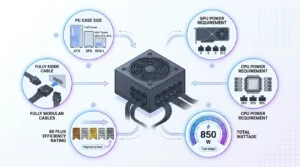
A few factors should drive your final decision, in roughly this order:
PC case size — measure your PSU bay before shopping, not after.
GPU power draw – refer to the recommended PSU wattage by the graphics card manufacturer.
CPU power draw — higher core-count chips push total system wattage up.
Airflow within your case –since a cramped PSU bay runs hotter regardless of unit quality.
Budget — Efficiency and modularity contribute to cost, but sometimes the cost of noise and cable cleanliness is worth it.
Noise tolerance–Larger fans (ATX, SFX-L) are quieter than smaller fans (SFX) when operating at the same load.
Efficiency rating: 80 PLUS Gold is a decent standard, and Platinum is better for heavy, continuous loads.
Fully modular vs non-modular — fully modular power supplies allow the cables that use to be installed, and this can make quite a difference when it comes to cable management in a large tower or a small case. Alternatively, if money is an issue, a “semi-modular” unit can be used.
Best SFX Power Supply Recommendations
For a budget SFF build, an 80 PLUS Bronze or Gold 450-550W SFX will be sufficient to handle a mid-range CPU and GPU without problems. If you’re not using a power-hungry graphics card, you do not need to go overboard on the wattage here.
For a gaming build, a small case with a bit more power is where SFX-L is going to get its money’s worth: 650-750W with at least 80 PLUS Gold certification will be able to handle a modern GPU with ease under sustained load.
For a workstation squeezed into a compact chassis, prioritize a fully modular unit. It gives you far more freedom to keep airflow clean around a dense cable environment.
A high-end Mini-ITX build running a flagship GPU is the clearest case for SFX-L over standard SFX — the larger fan keeps noise in check even when the system is pulling close to its full 850W–1000W ceiling. There are a handful of enterprise-class power supplies available through BulkDevices from well-known brands built for exactly this situation, backed by solid warranty coverage.
Common Questions
What is an SFX Power Supply?
An SFX power supply is a small form factor power supply that is designed for a small (SFX) case and Mini-ITX. It comes in about 125mm x 63.5mm x 100mm, which is much smaller than a typical ATX power supply.
Are All PSUs the Same Size?
No. PSU sizes differ according to form factor; the largest among the common sizes is ATX and one of the smallest is SFX. Between there and SFX, there’s SFX-L, which is roughly the same dimensions, but is equipped with additional length for a larger cooling fan.
What Is the Difference Between SFX and SFX-L?
SFX-L is longer than standard SFX (SFX), which permits a 120mm fan as opposed to an 80- 92 mm fan. They have the same mounting holes, but SFX-L is quieter and more comfortable to sustain extended weights.
Is Too Big a PSU Bad?
An oversized PSU isn’t harmful to your components, but it wastes space and can crowd cable routing in a small case. It also runs less efficiently at very low loads compared to a unit sized closer to your actual power needs.
Can I Use an SFX PSU in an ATX Case?
Yes, with an adapter bracket that lets the smaller SFX unit mount securely in a full ATX PSU bay. This is a common option for builders repurposing an SFX unit from a previous small form factor build.
What Is a Fully Modular Power Supply?
A fully modular power supply lets you attach only the cables your build actually needs, unlike non-modular units with permanently attached cables. This significantly improves cable management and airflow, especially in tighter cases.
Do I Need a High-Wattage PSU for a Compact PC?
Not always — depends more on the size of your CPU and GPU, and not on the case size. A compact PC build running with a mid-range GPU will be fine with a 550- 650W power supply, while a PC with a high-end GPU can use as much as 850W or more in the same case.
Is SFX-L the Best Option for Quiet SFF Builds?
Yes, for most high-performance small form factor builds. This means the larger 120mm fan in SFX-L has a lower speed than the smaller fan in standard SFX, and thus quiets significantly under heavy game or render sessions.
Final Words
In the end, the best option for you in the ATX vs SFX vs SFX-L argument is your situation, and not your ego regarding watts. For most desktop users, ATX remains the better choice due to cooling capacity and upgradeability. For those who need a compact build with a tight budget, SFX is the practical option, whereas SFX-L is best suited for those who are looking for quieter, more powerful cooling in a small form factor system.
Once you’ve determined your case’s PSU bay size, it’s much easier to make your choice — after that, you can take a look at the various enterprise power supplies and see which one will fit your needs.